[Bugzilla user: am@orthanc.team]
[Bugzilla date: 2023-04-12T13:15:01+00:00]

Created attachment 125
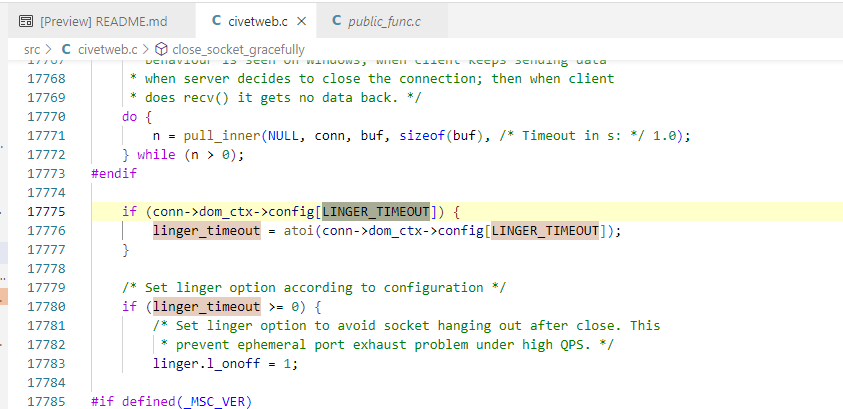
CivetWeb linger option

This is not really blocking and or maybe not a real bug but I'm writing the info here not to lose my notes (I have to switch to something else).

Note: I've reproduce this behaviour only when Orthanc is running inside docker but this is probably related to different ways to handle sockets from "loopback - localhost" or from remote connections.

Steps to reproduce:
Launch an Orthanc container:
docker run --name test-keep-alive -h test-keep-alive -d -p 8047:8042 -e ORTHANC__AUTHENTICATION_ENABLED=false osimis/orthanc:23.3.5

docker exec -it test-keep-alive bash
  root@test-keep-alive:/# apt-get update && apt-get install net-tools
  root@test-keep-alive:/# netstat -puta | grep 'Orthanc\|TIME_WAIT'

This should only show 2 sockets in LISTEN state

  root@test-keep-alive:/# netstat -puta | grep 'Orthanc\|TIME_WAIT'
  tcp        0      0 0.0.0.0:8042            0.0.0.0:*               LISTEN      1/Orthanc
  tcp        0      0 0.0.0.0:4242            0.0.0.0:*               LISTEN      1/Orthanc
  tcp        0      0 test-keep-alive:55530   151.101.10.132:http     TIME_WAIT   -           (these 2 can be ignored)
  tcp        0      0 test-keep-alive:55532   151.101.10.132:http     TIME_WAIT   -


In another terminal with python3 and requests installed, execute this python code:

Test 1: interval < KeepAliveTimeout (1 second)
----------------------------

import requests, time, logging
logging.basicConfig(level=logging.DEBUG, format="%(message)s")
s = requests.Session()
for i in range(0, 10):
  s.get("http://localhost:8047/system")
  time.sleep(0.5)

While Test 1 is being executed, show the used sockets (with netstat):

  root@test-keep-alive:/# netstat -puta | grep 'Orthanc\|TIME_WAIT'
  tcp        0      0 0.0.0.0:8042            0.0.0.0:*               LISTEN      1/Orthanc
  tcp        0      0 0.0.0.0:4242            0.0.0.0:*               LISTEN      1/Orthanc
  tcp        0      0 test-keep-alive:8042    172.17.0.1:36998        ESTABLISHED 1/Orthanc
  tcp        0      0 test-keep-alive:8042    172.17.0.1:36978        TIME_WAIT   -

Only one socket is ESTABLISHED and possibly one remains in TIME_WAIT (usually not)


Test 2: interval > KeepAliveTimeout (1 second)
----------------------------

import requests, time, logging
logging.basicConfig(level=logging.DEBUG, format="%(message)s")
s = requests.Session()
for i in range(0, 10):
  s.get("http://localhost:8047/system")
  time.sleep(1.5)

After Test 2 has been executed, show the used sockets (with netstat):

  root@test-keep-alive:/# netstat -puta | grep 'Orthanc\|TIME_WAIT'
  tcp        0      0 0.0.0.0:8042            0.0.0.0:*               LISTEN      1/Orthanc
  tcp        0      0 0.0.0.0:4242            0.0.0.0:*               LISTEN      1/Orthanc
  tcp        0      0 test-keep-alive:8042    172.17.0.1:37024        TIME_WAIT   -
  tcp        0      0 test-keep-alive:8042    172.17.0.1:37012        TIME_WAIT   -
  tcp        0      0 test-keep-alive:8042    172.17.0.1:37036        TIME_WAIT   -
  tcp        0      0 test-keep-alive:8042    172.17.0.1:37032        TIME_WAIT   -
  tcp        0      0 test-keep-alive:8042    172.17.0.1:37020        TIME_WAIT   -
  tcp        0      0 test-keep-alive:8042    172.17.0.1:37016        TIME_WAIT   -
  tcp        0      0 test-keep-alive:8042    172.17.0.1:37008        TIME_WAIT   -
  tcp        0      0 test-keep-alive:8042    172.17.0.1:37040        TIME_WAIT   -
  tcp        0      0 test-keep-alive:8042    172.17.0.1:37028        TIME_WAIT   -

10 sockets remain in TIME_WAIT.  You'll notice in the python logs that requests has been "resetting dropped connection: localhost"

Once the test is complete, you must wait 60 seconds before all the TIME_WAIT sockets have been released.

In real life, we have observed a lot of "sockets starvation" with a python script polling orthanc at a 1 second interval.  After a while, the script is not able to connect to Orthanc because Orthanc is not able to accept a new connection.  It usually works again immediately after.  In the phyton logs, it shows a connection error every 1-2 minutes.

The workaround is to have a polling interval smaller than the KeepAliveTimeout configured in Orthanc.

We might want to set a linger option but it requires more analysis.
References documentation:
- similar issue with moby https://github.com/moby/moby/issues/7350 (seems setting /proc/sys/net/ipv4/tcp_fin_timeout could be an option)
- in CivetWeb, it seems we could set a linger_timeout to release the socket earlier
|